Skip to content

Your own website with ticket sales

All your events in one place at yourname.ticketo.dk, with your logo and colors. Guests buy tickets right from the page, Google can find it, and it costs nothing extra.

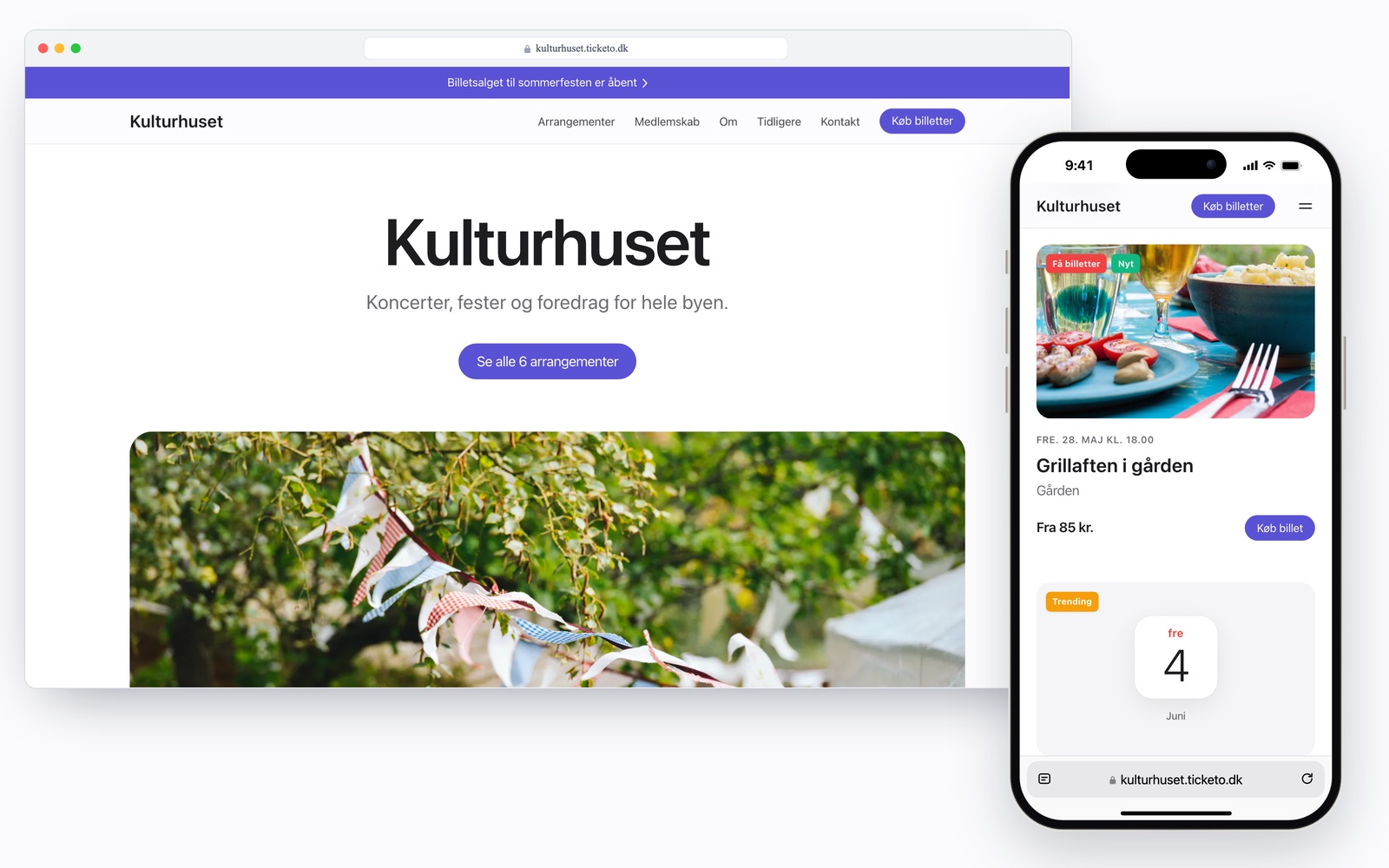
Kulturhuset's own page at kulturhuset.ticketo.dk on a computer and an iPhone, with upcoming events, prices and buttons for buying tickets

All your events in one place

The page shows your upcoming events with date, venue and price. It updates itself when you create a new event, and every event has its own button for buying tickets.

  • From prices, Sold out and labels like Few tickets left and Trending, just like on ticketo.dk
  • Search and filters appear on their own when there are many events
  • Past events, memberships and a section about you
  • Looks just as good on a phone as on a computer
Upcoming events on Kulturhuset's page with photos, dates, prices and labels like Few tickets left, Trending and Selling fast

What you get with your own page

Guests stay on your address

When a guest clicks an event, the event page opens on your own address with the same navigation bar as the front page. Payment takes place on Ticketo's secure checkout page, and from the checkout, the receipt and My tickets, guests come back to the event on your address.

The summer party's event page on kulturhuset.ticketo.dk with the same navigation bar as the front page, an image, a price and a button for buying tickets

Your look, no code

The page should look like you, not like us.

  • Logo, color and a light or dark theme
  • Four fonts and four ways to show the image at the top
  • A message at the top, e.g. when ticket sales open
  • Your own menu and up to six custom sections with text, image and button

Memberships and contact form

Your association's memberships are on the page with a price and a button to join. Guests can write to you through a form without your email address appearing on the page.

  • Memberships with recurring payment
  • Messages reach you by email

You choose where the event is shown

Everywhere, including Ticketo's front page and Google. Only on your own page, e.g. for merch and members' nights. Or private, so only people with the link can see it. You choose when you create or edit an event.

About private events

The choice Where should the event be shown? with three options: Everywhere, Only on your own page and Private

See the page as you edit

Everything is set up under Website in your account. The preview shows the real page on computer and phone while you edit, and nothing changes until you press Save.

Customizing the page: color choices, theme and font next to a preview of Kulturhuset's page in a browser window

See who finds the page

Visits per day, and where they come from, e.g. Google, Instagram or the QR code on the poster. The numbers are anonymous and cookie-free.

  • QR code for your address as PNG or SVG
  • No cookies, no cookie banner
Visits to Kulturhuset's page over the last 30 days as bars per day, and where the visits came from: Google, Instagram, direct and Facebook

The screenshots are from the system with sample data.

Built to be found on Google

The page is made so search engines can read it from the first visit. When someone searches for an association, a venue or a school, it's your own page that can show up with your events.

  • Your events are right in the page's code, so Google can read them without waiting for scripts
  • Structured data about you and every event, which Google can use to show date and price
  • Its own sitemap and robots.txt on your address
  • You write the title and description for search results yourselves
  • Fast on phones and free of tracking
  • If the page is only for people with the link, you turn Google off
The Google setting: showing the page on Google is turned on, and the title in search results is the page's default title

How to get your own page

  1. 1

    Create a free organizer account

    Name, email and an organizer name. We don't ask for a credit card.

    About 1 minute

  2. 2

    Get the blue checkmark

    Apply under Settings. We ask for your website or social media and a CVR number if you have one. The checkmark shows guests that you've been approved by Ticketo.

  3. 3

    Apply for your name

    Under Website, you choose the name, e.g. kulturhuset.ticketo.dk, and briefly say what the page will be used for. You can customize the page right away, even before the name is approved.

  4. 4

    We set up the address

    We approve every name by hand and set up the address. You get an email as soon as the page is live, and then you can share the link and the QR code.

The name application: kulturhuset.ticketo.dk is available, with a contact person and what the page will be used for

Costs nothing extra. No subscription. No commitment.

Create a free account

Your own page costs nothing extra

The page is included in your Ticketo account with no subscription and no extra fee. Only the regular ticket fee applies when you sell tickets, and by default the guest pays it on top of your price.

  • Free events cost nothing, for you or for the guest
  • The money can be withdrawn 5 days after each sale

See prices and fees

Questions about your own page

What does it cost to get our own page?

Nothing extra. The page is included in your Ticketo account with no subscription. Only the regular ticket fee applies when you sell tickets, and by default the guest pays it on top of your price. Free events cost nothing.

What does it take to get our own address?

An organizer account with the blue checkmark. You apply for the checkmark under Settings and then for your name under Website. We approve every name by hand and let you know by email when the address is live.

Which name can we get?

A name that resembles your own, e.g. kulturhuset.ticketo.dk. It must be between 3 and 30 characters with lowercase letters, numbers and hyphens, with Danish letters written as ae, oe and aa. You must have the right to use the name, and some names are reserved.

Can we use our own domain, e.g. tickets.yourclub.com?

Not today. Your page lives at an address under ticketo.dk. You can link to it from your own website and from social media.

We already have a website. Can we use both?

Yes. Keep your website for everything else, and let your events and ticket sales live on your Ticketo page. Link to it from your menu, or add a button or an event card to your website. You'll find the code under Widget.

Can Google find the page?

Yes, once the page is live. Your events are right in the page's code with structured data, the address has its own sitemap, and you can write the title and description for search results yourselves. If the page should only be for people with the link, you can turn Google off.

Where does payment take place?

On Ticketo's secure checkout page, where guests can pay with MobilePay, Apple Pay, Google Pay or card. The ticket is emailed right away, and afterwards the guest comes back to the event on your address.

Can an event be on our page without being public on Ticketo?

Yes. With your own address, you can choose Only on your own page when you create or edit an event. Then it's on your page, but not on ticketo.dk's front page, in search or on Google. If you choose Private, only people with the link can see it.

What can we change on the page?

Logo, color, light or dark theme, font, the image at the top, heading, text and button, a message at the top, the menu and the order of the sections. You can add up to six custom sections with text, image and button, and show contact details, a contact form and links to social media.

Can we change the name later?

Yes. Apply for a new name under Website. The old address keeps working until the new one is ready and then forwards to the new one, so old links and QR codes still work. A name is never passed on to anyone else.

What can we see about visits?

Visits, views and clicks per day for the last 7 or 30 days, and where the visits came from, e.g. Google, Instagram or direct. The numbers are anonymous and cookie-free.

Ready for your own page?

Create a free account, apply for the blue checkmark, and build your page while we look at the name.

Create a free account